Personalized study desk lamps are all about matching light output, color temperature, and adjustability to the way you actually study — and the gap between the best and worst in this category is wider than most buyers expect. The Honeywell Wide Desk Lamp earns my best overall pick thanks to its full-spectrum eye-caring light, wide dual-monitor coverage, and clamp-mounted design that frees up desk space. If budget is the priority, the Lepro LED Desk Lamp delivers reliable touch dimming at a fraction of the price, while the LitONES Premium Dual-Sided model stands out for students who want knob-controlled precision and soft, shadow-free lighting. The main tradeoff you’ll face is between desk-space-saving clamp lamps and feature-packed desktop lamps with built-in charging. Keep reading for the full breakdown of all 13 lamps and which one fits your setup.

Get wellness gear delivered free with Prime
- Fast, free delivery on millions of items
- Prime Video, Amazon Music and more included
- Member-only deals all year
Key Takeaways
- Clamp-mounted architect-style lamps (Honeywell, Pzloz, LIONVISION) dominated the top rankings because they cover dual-monitor setups and free up desk space — the two things students complain about most.
- Wireless charging lamps varied widely: only the Cozoo and Power Strip models offered enough ports to genuinely replace a charging hub, while cheaper charging lamps often sacrificed light quality for the gimmick.
- Under-$30 lamps like the Lepro and R RUCKERCO are fine for single-task reading, but none of them matched the full-spectrum light quality of the Honeywell or the adjustability of the LitONES Premium.
- Dual-sided lighting (LIONVISION, LitONES Premium) eliminated shadows better than single-head designs — a real advantage if you write by hand or spread out textbooks.
- Remote controls and touch panels split the lineup: remotes won for late-night adjustments from bed, while touch controls were faster for frequent brightness tweaks during study sessions.


More Details on Our Top Picks
Honeywell Wide Desk Lamp with Clamp for Dual Monitors, 22W Full-Spectrum Eye-Caring LED
This Honeywell model earns the top spot because it solves the problem most study lamps ignore: coverage. Its wide 22W light bar throws even, shadow-free illumination across a dual-monitor setup or a desk shared with textbooks and a laptop, something narrower lamps like the R RUCKERCO simply cannot match. The 3000K–5700K range with stepless dimming lets a student shift from warm evening reading to crisp daylight for detailed work without preset jumps. Compared with the Pzloz architect lamp, the clamp-and-arm design is more rigid and better at holding position over months of daily adjusting. The tradeoffs are real but minor for most: the housing warms during long sessions, and the 6.25 cm clamp limit rules out thicker butcher-block desks.
Pros:- Wide, even illumination that covers dual monitors without hotspots or shadows
- Stepless dimming plus 3000K–5700K tuning for genuinely personalized lighting
- CRI Ra≥92 full-spectrum light that renders textbook colors and details accurately
- Sturdy multi-section aluminum arm that holds its position over time
Cons:- Housing gets warm to the touch during extended use
- Clamp only fits desk edges up to 6.25 cm thick
Best for: Students and remote workers with dual monitors or wide desks who need even, glare-free coverage for multi-hour sessions
Not ideal for: Anyone with a thick wooden desk over 6.25 cm or a very small workspace where a 22W bar is overkill
- Power:22W
- Color Temperature:3000K–5700K
- Dimming:Stepless
- CRI:Ra≥92
- Clamp Thickness:Up to 6.25 cm
- Lifespan:30,000 hours
- Material:Aluminum and metal components
Our verdict“If you study at a large desk and want one lamp that does everything well, this is the one to beat.”
LIONVISON LED Desk Lamp for Office with Clamp & Stand, Double-Side Lighting
What separates this LIONVISON lamp from the pack is its double-sided lighting — upward and downward LEDs that balance ambient and task light so your eyes aren’t constantly readjusting between a bright page and a dark room. That makes it a strong pick for late-night study marathons where the Honeywell, with its downward-focused bar, leaves more contrast between desk and surroundings. The CRI 95+ accuracy also edges out most rivals here, which matters for art students and anyone on video calls. Its dual mounting — clamp or stand — gives flexibility the foldable USB-port lamp can’t offer. The catch: power consumption isn’t specified, and warranty details are thin, so you’re buying on lighting quality rather than documented reliability.
Pros:- Dual upward/downward LEDs reduce glare and harsh contrast for less eye fatigue
- CRI 95+ color accuracy for studying, artwork, and natural-looking video calls
- Both remote and touch controls with a memory function that recalls your settings
- Clamp or stand mounting adapts to crowded or open desks
Cons:- Power draw and energy efficiency are not specified
- No published warranty or durability information
Best for: Students prone to eye strain during long evening sessions, and anyone who takes frequent video calls
Not ideal for: Spec-driven buyers who want documented wattage, efficiency ratings, or a clear warranty before purchasing
- Control Methods:Remote & Touch
- Lighting:Double side light, upward & downward LEDs
- Color Temperatures:3000K–6500K
- Brightness:Adjustable
- Mounting:Clamp (up to 7cm desk edge) or stand
- LEDs:84 LEDs
- CRI:95+
Our verdict“The pick for anyone whose main complaint is tired, strained eyes after long study nights.”
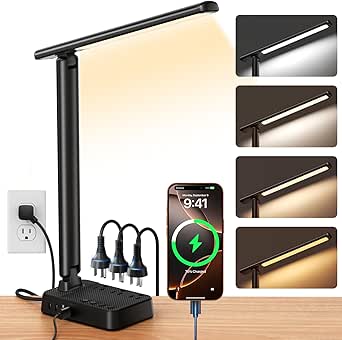
LED Desk Lamp with USB Ports, Touch Dimmable, Foldable, and Night Light
For students furnishing a dorm on a tight budget, this lamp bundles more utility per dollar than anything else in the lineup. The built-in USB-A and Type-C charging ports mean one fewer wall adapter fighting for outlet space — a perk only matched here by the Cozoo charging-station lamp, which costs more and takes up more room. Five color modes cover studying, reading, and winding down, and the soft night light is a thoughtful touch for shared rooms. The foldable arm slips into a backpack, unlike the clamp-mounted Honeywell. Be realistic about limits, though: 5V/2A charging is slow for phones and useless for tablets, and the three brightness steps feel coarse compared with stepless dimming on pricier models.
Pros:- Integrated USB-A and Type-C ports free up a wall outlet
- Foldable, flexible arm (230°) collapses for storage or travel
- Five color modes plus a gentle night light for shared bedrooms
- Flicker-free light at a student-friendly price
Cons:- 5V/2A charging output is slow and won’t meaningfully charge larger devices
- Only three brightness levels — no stepless dimming
Best for: Dorm residents and budget-conscious students who want lighting plus phone charging in one compact, packable device
Not ideal for: Anyone needing fast device charging or fine-grained brightness control for detailed work
- Light Colors:5 modes
- Brightness Levels:3 levels
- Flexible Arm:230°
- Base Axis:90°
- USB Ports:5V/2.1A USB-A & Type-C
- Power Adapter:5V/2A
Our verdict“The smart spend for students who want light, charging, and portability without paying for premium optics.”
R RUCKERCO LED Desk Lamp Dimmable Reading Light with USB Charger
This R RUCKERCO lamp plays a specific role in this roundup: the dependable, giftable middle ground. Three color modes and five brightness levels give it more tuning granularity than the budget foldable USB-port lamp‘s three steps, and its eye-care LEDs keep fatigue down during reading sessions — though it can’t match the LIONVISON‘s dual-direction glare reduction. Its party trick is the optional 18650 battery, making it the only lamp here that can run cordless, which suits bedside study nooks far from outlets. The gift-ready packaging genuinely matters if you’re buying for a graduating student. Just know the battery isn’t included, and getting the cordless mode set up involves sourcing and installing a cell yourself.
Pros:- Optional 18650 battery support for fully cordless operation
- 3 color modes × 5 brightness levels for finer tuning than budget rivals
- Eye-care LED technology reduces fatigue during long reading sessions
- Attractive packaging makes it a ready-to-give present
Cons:- Battery for cordless use is not included — an extra purchase and install step
- Setup for battery mode may confuse less technical users
Best for: Gift buyers and students who want a presentable, cordless-capable reading lamp for a bedside or outlet-scarce study spot
Not ideal for: Buyers who want everything in the box — the battery is extra, and the setup assumes some tinkering
- Lighting Modes:3
- Brightness Levels:5
- Power Cord Length:1.5 meters
- Battery:Optional 18650 battery (not included)
- USB Charging:Built-in USB charger
Our verdict“A safe, flexible gift choice that doubles as a genuinely useful cordless-capable reading lamp.”
LitONES LED Desk Lamp for Home Office, Soft Edge-lit Design
This LitONES model is the roundup’s two-in-one specialist: a study lamp that doubles as a webcam ring light. Students juggling online classes, presentations, and interviews get flattering front illumination without cluttering the desk with a separate ring light — something no other pick here offers, not even the video-friendly LIONVISON. The 26.7-inch swing arm reaches over monitors and notebooks alike, and the edge-lit panel produces softer shadows than direct LEDs. The 36-month warranty and claimed 100,000-hour lifespan also beat the coverage on most rivals, including the Honeywell‘s 30,000 hours. The downside is footprint: the swing arm and weighted base eat real desk real estate, and there’s no battery option, so it lives where you plug it in.
Pros:- Doubles as a webcam ring light, eliminating a separate gadget
- 26.7-inch swing arm with rotating head positions light exactly where needed
- Soft edge-lit panel with CRI ≥95 reduces harsh shadows and eye strain
- 36-month warranty and 100,000-hour LED lifespan outclass most competitors
Cons:- Swing arm and stable base require substantial desk space
- No battery option — fully tethered to an outlet
Best for: Students attending frequent online classes or interviews who want study lighting and webcam illumination in one device
Not ideal for: Cramped desks — the long swing arm and base demand clearance most dorm setups can’t spare
- LED Beads:84
- Lifespan:100,000 hours
- Swing Arm Length:26.7 inches
- Head Rotation:7.09 inches
- Base Thickness:0.27 inches
- Color Temperature:Adjustable
- CRI:≥95
- Warranty:36 months
Our verdict“The obvious pick if your study desk is also your video-call studio.”
LED Desk Lamp with 10W Wireless Charging & Pen Holder, Black
This model stands out for turning a study lamp into a mini workstation hub — wireless charging, a pen holder, and a phone stand all sit in the base, which matters when desk real estate is scarce during exam season. Compared with the Lepro LED Desk Lamp, it trades a little lighting sophistication (three color modes versus five) for pure convenience, and compared with the Cozoo Charging Station Lamp it swaps wall-outlet bulk for a cleaner wireless pad. The stepless 5%–100% dimming gives finer control than the Cozoo’s three fixed levels, though the 800-lumen output is modest for large work surfaces. Buyers should note the wireless pad struggles with thick phone cases and skips Qi EPP support for some Pixel models, so it’s not universal.
Pros:- Built-in 10W wireless charging plus pen holder and phone stand in the base
- Stepless 5%–100% dimming offers finer control than stepped alternatives
- Eye-caring LEDs with CRI 85+ and a 50,000-hour lifespan
- Three color modes cover warm study sessions and cool focus work
Cons:- Wireless charging fails through thick cases and lacks Qi EPP for Pixel 4a 5G
- Requires a proper 5V/3A adapter — underpowered chargers limit performance
Best for: Students and compact-desk workers who want charging and organization built into one device
Not ideal for: Pixel 4a 5G owners or anyone who keeps a rugged case on their phone — charging reliability suffers
- Wireless Charging Power:10W
- Color Modes:3
- Dimming:Stepless, 5%–100%
- Lumens:800
- CRI:85+
- Lifespan:50,000 hours
- Power Adapter:5V/3A
Our verdict“A sensible pick for students who value a tidy, charge-everything desk over maximum brightness.”
LED Desk Lamp with Clamp, Dual Head Monitor Light, Remote
Where single-head lamps like the Lepro leave the far side of a wide desk in shadow, this 24W dual-head clamp lamp spreads light across a 31.5-inch span — enough to cover two monitors and a keyboard without repositioning anything. The remote control and built-in timers (45 minutes to 2 hours) make it better suited to Pomodoro-style study blocks than every touch-only option in this lineup. Its anti-glare cover and 3,200K–6,500K range outshine the fixed three-mode presets of the LED Lamp with Wireless Charging & Pen Holder. The tradeoff: it’s a clamp-mounted, corded fixture that needs a compatible desk edge, and assembly instructions can be vague, so expect some setup friction compared with plug-and-play desk lamps.
Pros:- Dual heads span 31.5 inches to cover two monitors evenly
- Remote control plus touch buttons beats touch-only rivals for convenience
- Auto-off timers (45 min / 1 hr / 2 hr) suit timed study sessions
- Clamp mount frees desk surface that a base-stand lamp would occupy
Cons:- Corded only — no battery or cordless option
- Assembly instructions are inconsistent, adding setup time
Best for: Dual-monitor users and students with wide desks who need even, hands-off lighting
Not ideal for: Anyone with a fragile or edgeless desk — the clamp mount requires a sturdy lip to grip
- Power:24W
- Color Temperature:3,200K – 6,500K
- Dimming Levels:5
- Timer Options:45 minutes, 1 hour, 2 hours
- Extendable Length:31.5 inches
- Height:up to 32.7 inches
- Control:Remote and touch buttons
- Design:Double head, gooseneck, clamp mount
Our verdict“The strongest choice here for wide, multi-screen study setups that smaller lamps simply can’t cover.”
Lepro LED Desk Lamp for Home Office, 9.5W 750LM Touch Desk Light, Black
This is the pick for buyers who want decent personalized lighting with zero learning curve — five modes, five brightness levels, touch controls, and nothing else to configure. Compared with the Dual Head Monitor Light, there’s no remote, no clamp, and no timers, but there’s also no assembly and no clutter. Its flicker-free, diffused light holds up well against pricier entries for eye comfort during long reading sessions, and the fully adjustable arm directs those 750 lumens precisely — though that’s noticeably less output than the 24W clamp lamp, so it’s strictly a single-workspace light. The absence of charging extras found on the Cozoo or the Wireless Charging Lamp keeps the price down but means it does one job only.
Pros:- Five lighting modes and five brightness levels give real personalization for a budget price
- Flicker-free diffused light reduces eye strain during long study hours
- Energy-efficient with no heat emission
- Fully adjustable arm aims light exactly where it’s needed
Cons:- No smart features, remote, or charging functions of any kind
- 750 lumens is too dim for wide desks or dual-monitor setups
Best for: Budget-conscious students who want adjustable, eye-friendly light without paying for charging extras
Not ideal for: Gadget-lovers wanting wireless charging, USB hubs, or remote control — this lamp has none of them
- Power:9.5W
- Brightness:750 lumens
- Lighting Modes:5
- Brightness Levels:5
- Color:Black
Our verdict“A no-frills choice that gets the fundamentals of comfortable, adjustable light right for less.”
Cozoo LED Desk Lamp with Charging Station, USB-C, AC Outlet, Black
This option stands out as the most capable charging station in the batch — two USB-A ports, one USB-C, and a full 1250W AC outlet built right into the base. For a dorm room with limited wall sockets, it effectively replaces a power strip, something neither the 10W Wireless Charging Lamp (pad-only) nor the Lepro (nothing) can do. The lighting itself is more basic: three modes and three brightness steps lack the stepless dimming of the wireless-charging model, and there’s no remote like the Dual Head Monitor Light offers. Its quirks are real — the ports are always live with no switch, and the footprint runs bulky — but a memory function and pen holders round out a genuinely productivity-focused package.
Pros:- Charges via 2 USB-A, 1 USB-C, and a 1250W AC outlet — replaces a power strip
- Built-in pen holders keep the desk organized
- Memory function retains your last lighting preference
- Three color modes plus a timer cover basic study and reading needs
Cons:- No on/off switch for USB and AC output — ports stay energized constantly
- Bulky footprint crowds small desks
- Only 3 fixed brightness steps, less fine-grained than stepless rivals
Best for: Dorm residents and small-office users who need to charge a laptop, phone, and accessories from one device
Not ideal for: Tidy minimalists with tiny desks — the always-on ports and bulky base add clutter and standby draw
- Lighting Modes:Warm White, Cool White, Daylight
- Brightness Levels:3 adjustable levels
- USB Ports:2 USB-A, 1 USB-C
- AC Outlet:Standard 1250W
- Additional Features:Pen holders, timer, memory function
- Color:Black
Our verdict“Buy it for the power hub; the lighting is serviceable but not the reason to choose it.”
LED Desk Lamp with Wireless Charger, Black
Among the wireless-charging lamps, this one pulls ahead on light quality: a CRI of 90+ renders text and colors more naturally than the 10W Wireless Charging & Pen Holder Lamp’s 85+ rating, which matters for extended reading and detail work like sketching or color-coded notes. Its 360° adjustable tube offers more positioning freedom than most fixed-arm rivals, and the flared trumpet shade spreads light softly rather than beaming a hot spot. Compared with the Lepro, it adds the charging pad and finer 5%–100% dimming, though its three fixed color temperatures (3000K/4000K/5000K) skip the continuous tuning of the Dual Head Monitor Light. The deal-breaker to weigh: LEDs are sealed in and non-replaceable, so the lamp is done when the diodes eventually fade.
Pros:- CRI 90+ delivers more natural, accurate light than the 85+ wireless-charging rival
- 360° flexible tube allows unusually precise light positioning
- 10W wireless charging built into the base
- Flicker-free, eye-caring LEDs with smooth 5%–100% dimming
Cons:- Sealed, non-replaceable LED beads limit the lamp’s lifespan economics
- Only three fixed color temperatures — no continuous tuning
- No app or smart-home integration
Best for: Readers and students doing detail or color-sensitive work who also want wireless charging
Not ideal for: Long-horizon buyers who expect to repair rather than replace — the built-in LEDs can’t be swapped
- Wireless Charging Power:10W
- Color Modes:3000K, 4000K, 5000K
- Brightness Adjustment:5% to 100%
- Lumens:up to 800 lumens
- CRI:90+
- Adjustability:360°
- Design:Flared, trumpet-shaped shade
Our verdict“The wireless-charging lamp to pick when light quality for reading matters more than smart features.”
LitONES Premium LED Desk Lamp, Dual-Sided Soft Lighting with Knob Remote
Most lamps in this roundup chase brightness; the LitONES Premium takes the opposite approach with dual-sided soft 3D lighting that wraps your workspace in even, glare-free illumination. That double-sided design means no harsh hotspot on your textbook, which makes a real difference during marathon study sessions. The knob remote is the standout control scheme here — compared with the touch-only Lepro 9.5W model, twisting a dial to dial in brightness and color temperature feels faster and more precise, and the memory function keeps your settings between sessions. The aluminum-zinc alloy build and weighted metal base feel more premium than the plasticky competition too. The tradeoff is raw output: at 18 watts, it won’t flood a large desk the way the 24W Pzloz can, and the corded-only design ties you to an outlet.
Pros:- Dual-sided 3D lighting eliminates harsh hotspots and reduces eye strain
- Knob remote offers faster, more precise control than touch-only rivals
- Memory function preserves your preferred brightness and color settings
- Sturdy metal base and aluminum-zinc alloy build resist tipping and wobble
Cons:- Corded power only, so placement is limited by outlet location
- 18W output falls short for large desks or very bright workspaces
Best for: Students and readers who prioritize gentle, even lighting for long nighttime study sessions over maximum brightness
Not ideal for: Anyone lighting a deep desk or dual-monitor setup — 18W of soft ambient light won’t reach far enough
- Power:18W
- Voltage:12V
- Light Source:LED (54SMD)
- Controls:Knob remote and touch buttons
- Adjustability:Adjustable arm, stepless dimming and color
- Materials:Aluminum-zinc alloy and metal
- Mounting:Desktop with stable metal base
- Special Features:Double-sided dimmable, memory function
Our verdict“This pick makes the most sense for comfort-focused studiers who value soft, even light and tactile controls over sheer brightness.”
Pzloz LED Desk Lamp for Office and Home – Eye Caring Architect Lamp with Clamp, Dual Screen Compatibility, 24W
If your desk is dominated by two monitors, the Pzloz 24W architect lamp solves a problem most table lamps create: it clamps to the back of your desk and throws light across the workspace instead of at your face. With 360° stand rotation, 180° swing arms, and a 270° rotatable head, coverage rivals the Honeywell Wide clamp lamp, but the 25 lighting presets and included wireless remote push it ahead on customization — you can shift from a cool 5500K work setting to a warm 3000K evening glow without leaving your chair. Brightness scales from 20% to 100%, enough range for most tasks. The compromises are real, though: the remote occasionally misbehaves, and the multi-joint arm has a learning curve that simpler foldable models like the R RUCKERCO skip entirely.
Pros:- Clamp mount frees desk space and clears monitor glare from wide setups
- 24W output and 3000K-5500K range cover everything from reading to detailed work
- 25 lighting presets with wireless remote allow chair-side adjustments
- Extensive 360°/180°/270° articulation aims light exactly where needed
Cons:- Wireless remote can malfunction, leaving you reliant on manual controls
- Multi-joint adjustments take time to master compared with single-arm lamps
Best for: Remote workers and students with dual monitors or wide desks who need broad, clamp-mounted coverage
Not ideal for: Users who want simple plug-and-play lighting — the multi-axis arm and 25 modes add complexity that casual readers won’t use
- Power:24W
- Color Temperature:3000K-5500K
- Brightness Range:20%-100%
- Lighting Modes:25 presets
- Adjustability:360° stand, 180° swing arms, 270° rotatable head
- Control:Wireless remote
- Mounting:Desk clamp
Our verdict“Buy this if dual screens or a wide desk demand serious clamp-mounted coverage; skip it if you want a lamp you never have to fiddle with.”
LED Desk Lamp with Power Strip, 3 AC Outlets, 4 USB Ports, Stepless Dimming
Dorm desks have a math problem: one outlet, five devices. This lamp answers it by building a charging station into the base — three AC outlets plus four USB ports (two USB-C, two USB-A) — so your laptop, phone, and tablet all plug into your light. Compared with the Cozoo charging-station lamp, this model pulls ahead with USB-C support and a wider 2800K-6500K color range, plus genuinely useful extras like a sleep timer and memory function. The stepless 1%-100% dimming is smoother than the stepped modes on the R RUCKERCO, letting you find an exact nighttime brightness. The foldable arm and 180° head make it travel-friendly for semester moves. Two caveats: the 1200W/10A cap rules out chaining a space heater or kettle through it, and the feature-packed base will overwhelm anyone who just wants an on/off switch.
Pros:- 3 AC outlets and 4 USB ports (including 2 USB-C) replace a separate power strip
- Stepless 1%-100% dimming across a wide 2800K-6500K range
- Timer and memory functions simplify nightly routines
- Foldable design packs down easily for moves and storage
Cons:- 1200W/10A power cap limits what you can safely plug in
- Feature-dense base is confusing for users who want simple controls
Best for: Dorm residents and small-desk students who need to charge a laptop, phone, and accessories from a single lamp
Not ideal for: Minimalists who want a basic reading light — the multi-port hub base adds bulk and complexity you won’t use
- AC Outlets:3
- USB Ports:4 (2 USB-C, 2 USB-A)
- Power Capacity:Max 1200W/10A
- Dimming Range:1%-100% stepless
- Color Temperature:2800K-6500K
- Cord Length:5 ft
- Adjustability:90° arm, 180° flexible head
- Special Features:Timer, memory function, foldable design
Our verdict“This is the dorm-room winner — buy it for the charging hub as much as the light, and skip it if your desk already has plenty of outlets.”
How We Picked
I evaluated each lamp through the lens of a student’s actual study routine: how well the light covers a workspace, how precisely brightness and color temperature can be personalized, and whether the design fits a cluttered desk. Light quality and adjustability carried the most weight — full-spectrum output, multiple color modes, and stepless dimming separated true study lamps from generic task lights. Mounting flexibility mattered next, since clamp lamps that hover over monitors solve problems desktop lamps simply can’t. I also scored build quality, control ergonomics, and added features like charging ports, but only when those features didn’t compromise the core lighting performance.
The ranking order reflects a simple logic: lamps that personalize light precisely and fit real study setups rank highest, budget lamps that do one thing well sit in the middle, and feature-stacked lamps with mediocre light quality land lower. Price factored in as value rather than absolute cost — a $60 lamp that replaces three devices can outrank a $25 lamp that does less. Every pick below has real drawbacks too, because no lamp in this price range does everything well.
Factors to Consider When Choosing Personalized Study Desk Lamps
Before settling on a specific lamp, it helps to understand the broader patterns I found across this category. These are the factors that actually change how a lamp performs at a real study desk — and the mistakes buyers make most often.Clamp vs. Desktop Base: Match the Mount to Your Desk
The single biggest decision is how the lamp attaches to your desk, and buyers get this wrong constantly. Clamp-mounted lamps like the Honeywell and Pzloz shine when you have a monitor or laptop stand, because they position light over the screen edge and reclaim the desk surface that a base would occupy. The catch: clamps need a desk edge of suitable thickness, and they don’t work on some glass or metal-frame desks. Desktop lamps are more portable and simpler to position, but on a small student desk they eat 6–10 inches of workspace. My general rule: if your desk is under 40 inches wide or holds two screens, go with a clamp. If you move between locations — dorm, library, home — a foldable desktop lamp makes more sense.
Color Temperature Modes and Why They Matter for Focus
Cheaper lamps advertise “3 lighting modes” without explaining why you’d switch between them, so here’s the practical version. Cool white (5000K+) supports alertness and suits morning study sessions and detailed work like diagrams or proofreading. Warm light (3000K or below) reduces evening eye strain and won’t disrupt sleep the way blue-heavy light can — useful for late-night review sessions. The mistake most buyers make is leaving the lamp on its default mode permanently, which defeats the point of a personalized lamp entirely. Lamps with 5 color modes (like the Pzloz) or stepless temperature control give you room to actually match light to your task and time of day. If you study at all hours, temperature adjustability is worth more than raw brightness specs.
Brightness and Coverage: Lumens Aren’t the Whole Story
A 750-lumen lamp like the Lepro sounds impressive until you realize lumens measure total output, not how evenly light spreads across your workspace. Coverage area matters more than peak brightness for study use — a wide architect lamp at moderate brightness beats a narrow beam at full power, because uneven light forces your eyes to constantly readjust as you glance between textbook, notebook, and screen. Dual-head and dual-sided designs (the LIONVISION, LitONES Premium, and dual-head clamp lamps in this list) exist specifically to solve this, casting shadow-free light across a wider zone. Also check whether the lamp dims smoothly at the low end: many budget lamps flicker or jump between levels when dimmed, which becomes genuinely annoying during evening sessions. If you work with paper and screen simultaneously, prioritize coverage over headline lumen numbers.
Charging Features: Convenience or Compromise?
Roughly half the lamps in this roundup bundle wireless charging, USB ports, or AC outlets, and the pattern I found is consistent: charging features are only worth it when they’re the lamp’s primary selling point. The Cozoo and the Power Strip model integrate charging thoughtfully — enough ports to replace a separate hub and genuinely clear cable clutter. But several mid-range lamps tack on a single wireless pad while delivering mediocre light, meaning you pay twice for two half-baked products. Another practical point: lamps with built-in AC outlets need to sit where your cables can reach, which can fight with your ideal light placement. If your desk is a cable disaster, a charging-integrated lamp is a real upgrade. If your light quality is the priority, buy a simpler lamp and a separate charger.
Eye-Care Claims: What to Actually Look For
Nearly every lamp here claims to be “eye-caring,” which makes the label almost meaningless on its own. The specs that back the claim up are flicker-free drivers, full-spectrum or high-CRI LEDs, and diffused edge-lit panels rather than exposed LED beads. Full-spectrum lamps like the Honeywell render colors accurately and reduce the fatigue some people get from narrow-band LED light — a real difference if you study for multi-hour blocks. Edge-lit designs (the LitONES models) diffuse light through a panel, softening shadows and glare compared with direct-bead lamps at the same brightness. If you’re prone to headaches or eye strain, these features matter more than any brightness or mode count. If your sessions are short and casual, a standard diffused lamp will serve you fine.
Controls and Daily Usability
The control scheme sounds trivial until you’ve adjusted brightness 40 times in a week. Touch panels (Lepro, the foldable USB model) are fast for frequent tweaks but can be oversensitive — accidental swipes when reaching past the lamp are a common complaint. Knob and remote controls (LitONES Premium, the dual-head remote model) offer precision and work from across the room, which suits students who adjust lighting from bed or a reading chair. Physical buttons on budget lamps are less elegant but never misfire. Also consider memory function: lamps that remember your last brightness and color setting save a genuinely surprising amount of daily friction. This is a personalization category, so the control you’ll actually enjoy using should carry more weight than it seems on a spec sheet.
Frequently Asked Questions
Is a clamp-mounted lamp or a desktop lamp better for a small study desk?
For desks under about 40 inches wide, a clamp lamp is almost always the better call because it removes the base from your workspace entirely and positions light over monitors or textbooks without creating shadows. The Honeywell and Pzloz clamp models in this roundup are built exactly for that scenario. Desktop lamps still make sense if your desk has no suitable edge for clamping, if you use a glass or metal-frame desk, or if you need to move the lamp between rooms regularly. Foldable desktop models like the touch dimmable USB lamp are the most portable option in this list. The tradeoff to weigh is stability versus space: clamps hold position better for dual-monitor setups, while desktop bases are simpler and work anywhere.
Are lamps with built-in wireless charging worth the extra cost?
It depends entirely on whether the charging is the lamp’s main feature or an add-on. Lamps like the Cozoo with a full charging station and the Power Strip model with three AC outlets and four USB ports can genuinely replace a separate hub, clearing cables off your desk and justifying their price. Lamps that add a single wireless pad onto otherwise average lighting tend to be worse at both jobs — you’re better off buying a focused lamp and a standalone charger. Check whether your phone actually supports the charging standard on offer, since some pads charge older phones slowly or not at all. If cable clutter is your biggest desk frustration, an integrated charging lamp is one of the better upgrades in this category. If light quality is your priority, skip the charging features and spend the budget there.
What color temperature should I study under?
For most students, cool white around 5000K during the day and warm light below 3500K in the evening is the pattern that works best — cool light supports alertness for focused work, while warm light reduces strain and is less likely to interfere with sleep before bed. This is exactly why lamps with multiple color modes or stepless temperature control outperform fixed-color lamps for study use: you can match the light to the session instead of adapting to the lamp. The Pzloz with its five color modes and the stepless-dimming Power Strip model handle this well. If you only study at one time of day, a fixed-temperature lamp is a reasonable way to save money. If your schedule ranges from morning classes to midnight review, temperature adjustability is the feature worth paying for.
Do I really need full-spectrum or ‘eye-caring’ LEDs for studying?
For short study sessions, standard diffused LEDs are perfectly comfortable, and you shouldn’t pay a large premium just for the label. But if you regularly study for two or more hours at a stretch, full-spectrum output and flicker-free drivers make a measurable difference in fatigue — the Honeywell’s full-spectrum light is a big part of why it ranks at the top of this list. High-CRI light also renders textbook colors and diagrams accurately, which matters more than people expect for detailed work. The “eye-caring” marketing term alone tells you little, so look for full-spectrum, high CRI, or edge-lit diffusion in the specs instead. Edge-lit panels like those on the LitONES models soften glare in a way direct LED beads can’t. Treat this as a long-session upgrade, not a baseline requirement.
Can one lamp light a dual-monitor setup, or do I need two?
One wide lamp is usually enough if it’s designed for the job — the Honeywell’s wide bar and the Pzloz’s dual-screen compatibility exist precisely to cover two monitors from a single clamp, and they do it without the cost and clutter of a second lamp. The key spec is coverage width; a compact desktop lamp simply can’t throw even light across 40-plus inches of desk, no matter its brightness rating. Dual-headed lamps like the LIONVISION and the remote-controlled dual-head clamp model take a different approach, angling two light sources independently to eliminate the dead zone between screens. If your monitors are unusually large or your desk exceeds 60 inches, a dual-head design is the safer choice. For typical two-screen student setups, one wide architect lamp handles it.
Conclusion
The right pick here depends less on budget and more on how your desk is laid out and how long you study. Best overall goes to the Honeywell Wide Desk Lamp — its full-spectrum light, dual-monitor coverage, and clamp mount make it the most complete study lamp in this lineup. Best value is the Lepro LED Desk Lamp, which delivers reliable touch dimming and solid brightness for students who just need dependable light without paying for extras. Best premium pick is the LitONES Premium Dual-Sided model, whose knob remote and shadow-free dual-sided lighting suit serious multi-hour study sessions. For beginners or first-time buyers, the R RUCKERCO or the foldable touch lamp keep things simple and inexpensive while covering the basics well. For specific needs: the Cozoo or Power Strip model for charging-hub desks, the Pzloz if you want five color modes on a clamp mount, and the LitONES Soft Edge-lit lamp if glare sensitivity is your main concern. Whichever direction you go, prioritize coverage and adjustability over gadget count — that’s what consistently separated the top of this list from the bottom.
Halloween Picks
halloween
As an affiliate, we earn on qualifying purchases.